
All indicators
Risk management
MYI Calculator
Turns your risk plan into an exact position size. Place three draggable lines on the chart — entry, stop loss and take profit — and the table instantly shows what you lose if the stop is hit, what you make if the target is hit, and exactly how many lots to open so your loss equals the risk you defined.
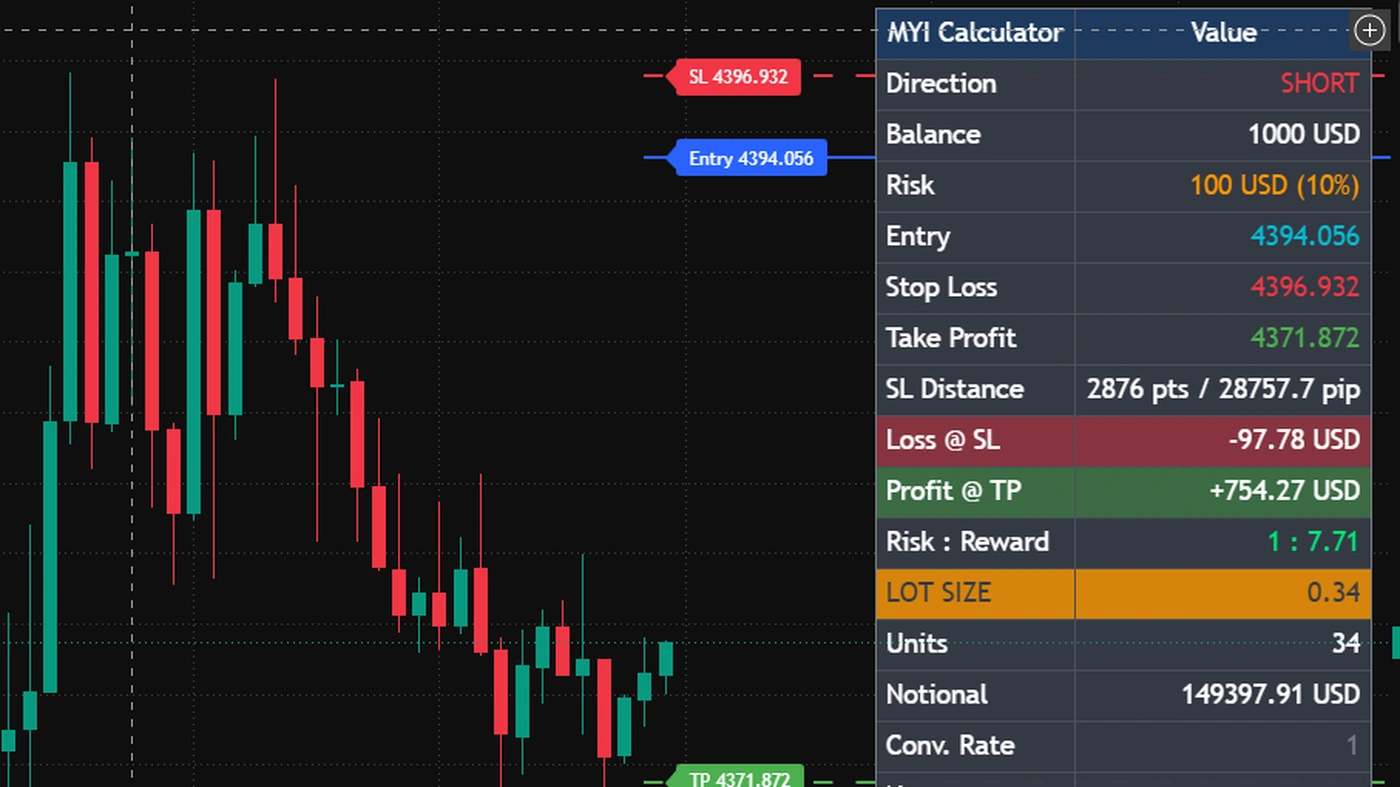
What you see on the chart
- Three draggable lines — Entry, Stop Loss and Take Profit. Drag any of them and every number recalculates instantly.
- The direction, long or short, detected automatically from where the stop sits relative to the entry.
- Your loss at the stop, your profit at the target, and the risk-to-reward ratio — in your account currency, before you enter.
- The lot size or contract count highlighted, alongside the units and the notional value of the position.
What it does for you
- Always rounds the size down to your broker's lot step, so your loss can never exceed the risk you set — then recomputes loss and profit from the rounded size, so the figures on screen are the real ones.
- Ships instrument presets for forex, gold, silver, indices and crypto, plus futures contracts that are automatically rounded to whole contracts.
- Has warnings built in: a stop equal to the entry returns a clear error instead of a misleading number, and a target on the losing side shows a warning rather than a fake profit.
- Gives no buy or sell signals and places no orders. It is a calculation and planning tool, and that is exactly the point.
Settings
| Setting | What it does |
|---|---|
| Account balance | The balance every risk figure is calculated from. |
| Risk mode | Risk a percentage of the balance, or a fixed cash amount per trade. |
| Instrument preset | Forex, gold, silver, indices, crypto, or a futures contract — so the contract size is correct for what you are trading. |
| Contract size | Overrides the preset for a broker whose specification differs from the standard. |
| Lot step / minimum lot | Matches the rounding to your broker's rules. If the required size falls below the minimum, the table warns you that your real risk is higher than configured. |
| Quote to account rate | Converts the symbol's quote currency into your account currency. Leave it at 1 for symbols already quoted in your account currency; the table flags it in orange whenever it is not 1, because a wrong value here mis-sizes the position badly. |
| Language | Switches the whole table and every on-chart label between Arabic and English. |
Alerts
MYI Calculator is a planning tool and does not emit trade signals, so it ships no alerts of its own. Pair it with MYI Reversl, MYI Zones or MYI Key Levels when you want alerting, and use the calculator to size whatever those produce.
Get this indicator
Included in the MYI369 subscription, which unlocks all four indicators.