
MYI Reversl
A single decision panel that turns a clean chart into a ready-made trade plan: one entry zone, one stop level, and three take-profit targets — with live touch-lights that show you exactly where price is acting right now.
What you see on the chart
- A golden entry zone holding four precise entry prices, floating at the right edge of the chart so your candles stay clean.
- One stop-loss band in red and three target bands in green at 1:1, 1:2 and 1:3 — each labelled with its exact price.
- Live touch-lights in the panel: every level starts white, an entry turns yellow while price is touching it, a target turns green, and the stop turns red if it is tagged.
- An ACTION row that says it plainly: wait, or enter now — with a ★ marking a higher-confidence entry.
What it does for you
- Calculates your lot size automatically from your balance, your risk percentage and the entry-to-stop distance, and shows the dollar value of each target before you enter.
- Runs an internal confirmation engine in the background that reports the market's overall direction, so you are not entering against the prevailing flow.
- Gives you two panel views: Beginner shows only the essentials, Professional adds the direction score, trigger state and a confidence reading.
- Never repaints. Anything printed on the chart stays exactly where it was printed.
A real trade, start to finish
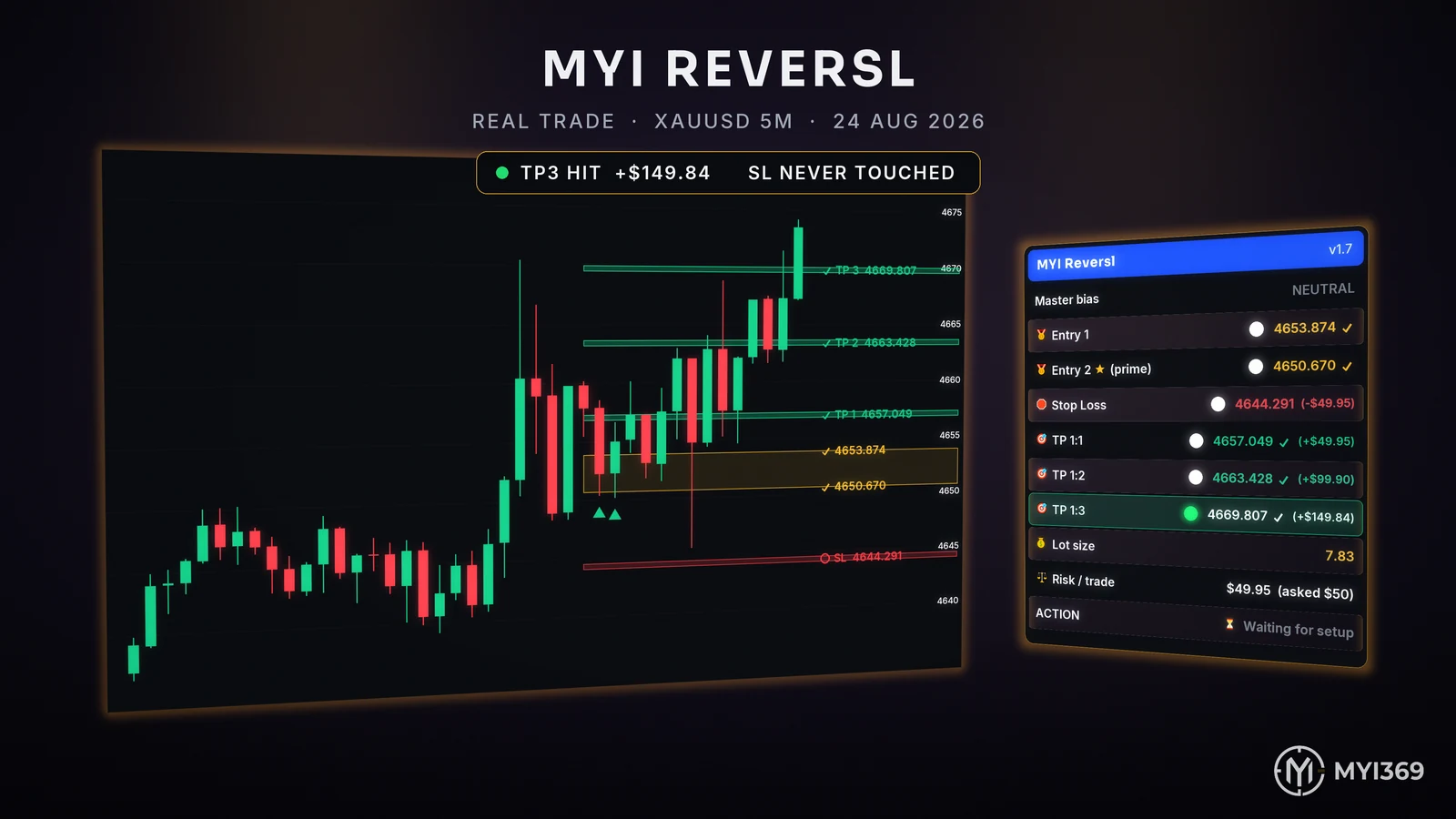
Gold, 5-minute chart, 24 August 2026. Both entries filled at 4653.874 and 4650.670. Price ran to TP1, TP2 and finally TP3 at 4669.807 — +$149.84 on a 7.83 lot, with the stop at 4644.291 never touched. Every figure below is taken from that trade, unedited.
And the moment a signal fires
Captured from TradingView bar replay on gold, 1-minute chart — 14 August 2026, 18:39 (GMT+3). The ACTION row turns green and reads ENTER NOW — BUY, with entry, stop and all three targets already priced.
Settings
| Setting | What it does |
|---|---|
| Language | Switches the whole panel and all on-chart labels between Arabic and English. |
| Table view | Beginner shows the essentials only. Professional adds direction score, trigger state and confidence. |
| Money management | Account balance, risk mode (percent of balance or a fixed cash amount), risk value, contract size, lot step and minimum lot. |
| Targets | Turn TP 1:1, 1:2 and 1:3 and the stop-loss band on or off individually. |
| Confirmation | Enable or disable each confirmation layer and set how strictly it filters — from scoring only, through to a hard veto on weak setups. |
| Display | Panel position, label size, how far the zone floats from the last candle, and whether the golden zone is drawn at all. |
Alerts
Create one alert on the indicator and choose "Any alert() function call" as the condition. You then receive every signal — and optionally every target and stop hit — with the symbol, the timeframe and all prices included. Switch the message format to JSON to drive a webhook or an execution bot.
Get this indicator
Included in the MYI369 subscription, which unlocks all four indicators.